MirrorLink
- 4.2
- Rating
- 1.00M
- Installs
- Free
- Price
 Analysis by App-foxy
Connecting a phone to a car can sound simple until the cable, dashboard system, and phone all decide to behave differently. I approached Mirror Link Car Connector with that everyday frustration in mind: not as a flashy screen-mirroring toy, but as a practical tool for making a phone and a compatible car work together with less repetition. After using it, my impression is that its appeal is strongest during the first few drives, while its lasting value depends heavily on your vehicle, phone, and how often you actually need this kind of connection.
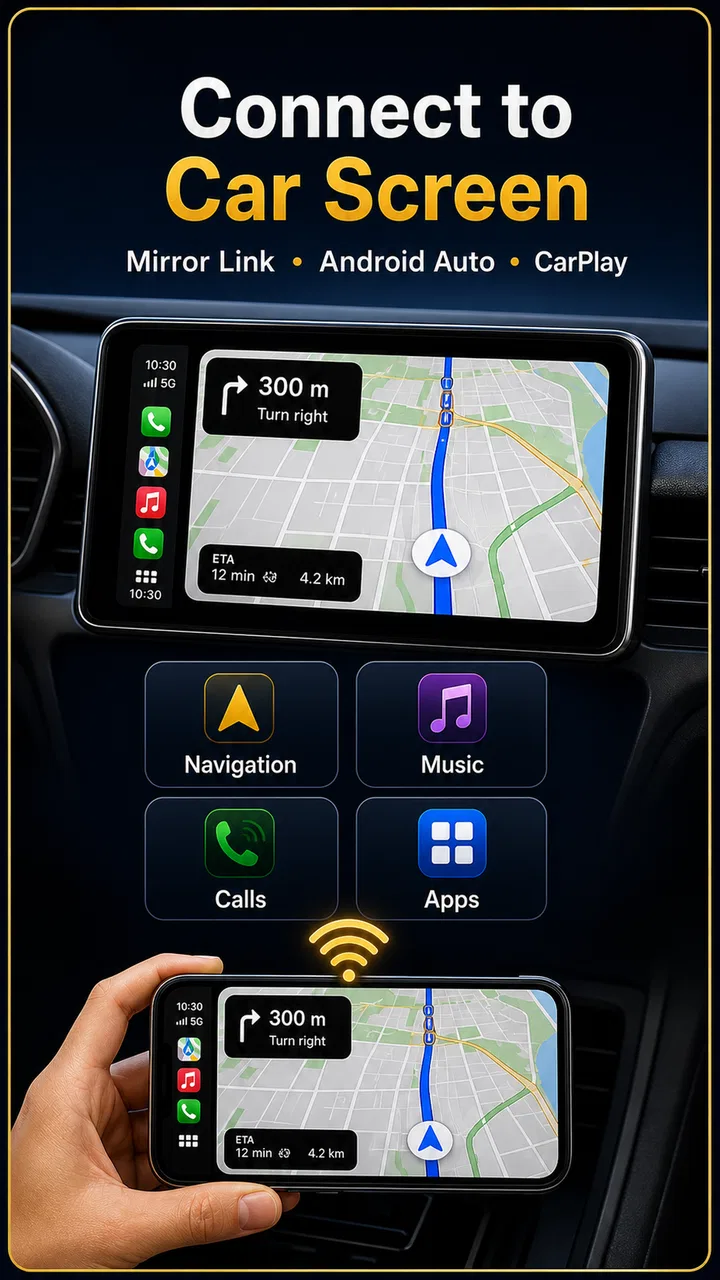
This is a free app from FastSoft in the Libraries & Demo category. It is aimed at people who want a simpler route into MirrorLink, CarPlay, or Android Auto-style phone-to-car use. The app is rated for Everyone, works from Android 7.0 onward, and the current version is 2.1.0. Its broad audience is reflected in more than a million installs, while its average rating sits at 4.1 from roughly thirty-two thousand ratings. Those figures suggest a useful, familiar tool, but not one that removes every compatibility problem.
What using it feels like beyond the first connection
I also look beyond connection success to whether the process stays understandable when attention, vision, or the driving environment is less than ideal. The next section considers the practical effect of screen interaction, sound, and hands-free habits, before turning to where access can still become difficult.
You May Also Like

 Pandora - Music & Podcasts
Pandora’s Music Is Easy to Start, but Harder to Recover
Pandora’s strength is its low-effort path from a seed to a station. Its weak spot is how much confidence it asks you to place in connection, setup, and quiet recovery.

 8 Ball Pool
 Is Built on Rivalries, Rematches, and Routine
A close look at the rivalries, rematches, shared routines, and unanswered safety questions that turn a quick pool match into a persistent mobile community.

 Samsung Music
’s Quiet Strength Is Playing What You Already Own
Its reach comes less from spectacle than from dependable access to a personal library. That simplicity is both the app’s strongest retention engine and its ceiling.

 AccuWeather: Weather Radar
AccuWeather Review: A Quick, Clear Forecast for Everyday Decisions
For everyday plans, the best forecast is the one you can understand quickly. AccuWeather makes rain timing, radar, and local conditions easy to act on, with a few trade-offs.

 Hill Climb Racing
Why Hill Climb Racing Still Turns Crashes Into One More Run
A tiny car, a bumpy hill and one more upgrade: Hill Climb Racing keeps resurfacing because its simple chaos makes every near-miss feel personal.

 AliExpress - Shopping App
AliExpress Makes Global Shopping Feel Personal, but Shoppers Bear the Risk
AliExpress turns a global marketplace into a pocket-sized discovery engine. Its reach is useful, its shopping loop compelling, and its trade-offs easy to miss.
More From Our News Desk
View All News


The first-week appeal is mostly about reducing friction
The strongest part of the experience is the promise of a more direct starting point. Instead of repeatedly searching through the car’s menus, checking connection options, and trying to remember which phone setting worked last time, I can use the app as a central place to begin the process. That matters most when I am already in a hurry, such as leaving work, collecting someone, or starting a long drive in an unfamiliar car.
A realistic example is a weekday commute. I get into the car, place the phone where it will remain visible and safe, and try to establish the connection before moving. When everything is compatible, the app can make the routine feel more organized: the phone is prepared for the car rather than treated as a separate device that must be configured from scratch every morning. The benefit is not dramatic entertainment; it is the small reduction in setup effort that can make a repeated journey less annoying.
The first-week novelty also comes from seeing familiar phone content presented through the vehicle’s interface. That can make a newer car feel more useful and may help owners understand what their dashboard system is capable of. For someone who has just bought a used vehicle and is unsure how to approach its phone integration, having a dedicated connector app can be less intimidating than exploring every option alone.
Still, I would not confuse a connector with a universal compatibility fix. The car must support the relevant connection method, and the phone must cooperate with it. If the vehicle does not support MirrorLink, CarPlay, or Android Auto in the way you expect, an app cannot magically add the required hardware or dashboard capability. This is the first important trade-off: the app can simplify a supported setup, but it cannot turn an incompatible car into a fully compatible one.
Where the app fits among the usual alternatives
Many drivers begin with the official Android Auto or Apple CarPlay route, and that remains the better choice when the car and phone already support it directly. Official platform tools usually provide the clearest integration with navigation, calls, messages, and media controls. They are also the natural starting point when reliability matters more than experimenting with an additional connector.
Mirror Link Car Connector makes more sense when you want a single place to explore available connection paths, especially if your vehicle documentation is vague or the dashboard offers several phone-integration choices. It can be a convenient companion for people who do not want to keep opening separate settings screens. However, I would not install it expecting it to replace the official app or the car manufacturer’s instructions in every situation.
There is also a practical difference between screen mirroring and a purpose-built driving interface. Mirroring can expose more of the phone’s display, but that does not automatically make every app comfortable or safe to use while driving. A dashboard-friendly system is generally preferable for navigation and audio because it limits interaction to functions designed for the road. I treat the connector as a setup aid, not permission to operate a phone freely behind the wheel.
Small workflow changes make a bigger difference than extra experimentation
One useful habit is to test the connection while parked before relying on it for a trip. I check whether the car recognizes the phone, whether the display appears as expected, and whether audio is routed through the vehicle. Doing this at home or before leaving a parking space is much less stressful than discovering a problem at a junction or on a motorway.
A second tip is to keep the first test deliberately simple. I begin with one phone, one connection method, and one familiar destination rather than changing several settings at once. If the link fails, I then know which part of the setup needs attention. This is more effective than repeatedly tapping options without recording what changed.
A third practical insight is that the app is more valuable when treated as a repeatable routine rather than a one-time demo. I use the same order each time: unlock the phone, open the connector, connect while stationary, confirm the dashboard response, and only then start driving. That sequence reduces the temptation to troubleshoot while moving and makes it easier to identify whether the problem is the phone, the car, or the connection method.
What remains useful after the novelty fades
After the first few drives, the question changes from “Can this connect?” to “Does it save me enough effort to keep using it?” For occasional drivers, the answer may be yes. If you regularly switch between a personal car and a family vehicle, or if you often help another person connect a phone to their dashboard, a dedicated starting point can remain handy. It is also useful for drivers who forget the exact route through Android settings every time they change vehicles.
For daily use, the value is more conditional. If the car remembers the phone and reconnects automatically, I may not need to open the app often. In that situation, the app’s lasting role becomes more about troubleshooting and initiating a connection when the usual routine breaks. That is not a criticism; many useful utilities become almost invisible once the surrounding system is configured properly.
The app is therefore not something I would expect to occupy my attention on every drive. Its recurring value comes from reducing the occasional setup problem, not from adding a constant stream of new content. That makes it a better fit for practical users than for anyone looking for a feature-rich dashboard replacement.
The maintenance burden is modest, but compatibility still needs attention
Because this is a connection-focused utility, maintenance is less about managing a library inside the app and more about keeping the whole phone-to-car chain stable. The phone’s operating system, the car’s software, the cable if one is used, and the dashboard’s own settings can all affect the result. When a connection suddenly stops working, the app may be only one part of the problem.
I recommend keeping the setup tidy. Remove old phones from the car if the vehicle has reached its saved-device limit, avoid testing several connection methods simultaneously, and confirm that the intended phone is the one selected for the session. These are not glamorous steps, but they prevent a common source of confusion: the car connecting to an old device while the current phone appears to be malfunctioning.
Another sensible habit is to avoid changing a working setup without a reason. If the connection is reliable, I would not repeatedly switch between mirroring and other dashboard modes just to explore every option. Experimentation is best done while parked, because a change that looks harmless in the driveway can become distracting when the car is moving.
The minimum operating system requirement is Android 7.0, which gives the app a wide reach across older devices. That is helpful for drivers who are not using a recent phone, although an older phone may still have its own limitations with modern vehicle systems. The important point is that meeting the app’s operating-system requirement does not guarantee that every car feature will be available. The vehicle and phone must still support the same connection path.
Where everyday fatigue can appear
The main source of fatigue is uncertainty. A successful connection can feel effortless, but a failed one may leave me wondering whether I should restart the app, reconnect the cable, change a phone setting, select a different dashboard source, or restart the car. An app that gathers connection tools in one place can reduce some of that confusion, but it cannot eliminate the underlying differences between vehicles.
Another point of friction is the gap between what appears on a phone and what is comfortable on a dashboard. A mirrored display may show more than a restricted driving interface, yet more choice can also mean more distraction. I prefer to prepare navigation and audio before setting off, then use the car’s controls whenever possible. If I wanted unrestricted phone access on the dashboard, I would consider that a reason to pause and reassess the setup rather than a reason to praise the app.
There is also a risk of overestimating what the word “connector” means. I see this app as a bridge into supported vehicle functions, not as a replacement for a missing CarPlay receiver or a way to retrofit every old stereo. Drivers with an incompatible head unit should look first at hardware options, manufacturer support, or a proper aftermarket solution. Installing another app is unlikely to solve a limitation that exists in the car itself.
People who want a polished, officially integrated experience may find the extra layer unnecessary. If the official Android Auto or CarPlay application already reconnects consistently, adding another utility can create more steps rather than fewer. In that case, I would keep the official route and use this app only if it solves a specific problem.
Who will get the most from it
I would recommend Mirror Link Car Connector to a driver who has a compatible vehicle but finds the connection process confusing or inconsistent. It is also a reasonable choice for someone using an older Android phone that meets the operating-system requirement and wants to investigate available phone-to-car options without immediately buying new hardware.
It may help families as well. If several people use the same car, the app can serve as a familiar starting point when a new phone needs to be connected. The key is to establish one device at a time and confirm the result while parked. That simple discipline matters more than repeatedly reinstalling software or changing several settings together.
I would skip it if your car has no relevant phone-integration support, if you need guaranteed professional-grade reliability for work, or if your official dashboard solution already meets your needs. I would also avoid making it the centerpiece of a driving setup if your priority is a tightly controlled interface for navigation and calls. In those cases, official platform support or a hardware upgrade is the more sensible direction.
Free access helps, but it does not remove the need for judgment
The app is free, which lowers the cost of trying it on a compatible Android device. That makes experimentation less risky than purchasing a dedicated accessory before knowing whether your car and phone will work well together. I appreciate that a driver can test the basic idea without committing money to a new dashboard system.
Free, however, should not be mistaken for effortless. The real investment is time spent learning the car’s menus and establishing a stable routine. If the first attempt fails, I would not immediately conclude that the app is useless. I would test the phone with the car while stationary, confirm the selected connection mode, and compare the result with the vehicle’s own documentation. If repeated tests still fail, the likely issue may be compatibility rather than something the app can repair.
The Everyone content rating also makes it approachable for a broad audience, but safe use still depends on the driver. No connector app should encourage touching the phone while driving. I prepare the route and media first, keep the phone secured, and rely on voice or dashboard controls whenever they are available.
My long-term verdict
My lasting opinion is positive but measured. Mirror Link Car Connector earns a place on the phone of someone who regularly needs help starting or checking a phone-to-car connection. It is especially useful during the first setup, when moving between vehicles, or when a familiar connection unexpectedly stops behaving. Its practical strength is not constant entertainment; it is removing a little uncertainty from a recurring task.
After the novelty fades, I would expect many users to open it less often. That is perfectly acceptable if the connection routine becomes dependable. The app does not need to be used every day to justify its space; it needs to be available when the car and phone stop cooperating. For occasional troubleshooting, that can be worthwhile.
At the same time, I would not describe it as a universal answer for every dashboard. Official Android Auto or CarPlay remains the better route when it is already supported and stable, while incompatible hardware requires a hardware solution rather than another connector app. The right choice depends on whether your problem is setup friction or a genuine limitation in the vehicle.
My recommendation is to try it when you have a compatible car and want a simpler connection workflow, then judge it by the number of steps it removes from your real routine. If it helps you connect calmly before a drive and remains available for occasional fixes, it has lasting practical value. If it merely adds another screen to an already reliable official setup, uninstalling it may be the more honest long-term decision.
For me, that balance is what makes the app worthwhile: useful as a bridge and troubleshooting companion, but not something I would force into a setup that already works. FastSoft has made a straightforward utility for a common problem, and its success depends less on novelty than on whether it fits naturally into the driver’s established habit.
FAQs for MirrorLink
01What is Mirror Link Car Connector and how does it work?
Mirror Link Car Connector is an app designed to seamlessly connect your smartphone to your car's infotainment system. It allows you to mirror your phone's display onto your car's screen, enabling easy access to apps, navigation, and media. To use it, simply connect your phone to your car via USB or Bluetooth, and follow the on-screen instructions.
02Is Mirror Link Car Connector compatible with all cars and smartphones?
Compatibility is a key concern for Mirror Link Car Connector users. The app works with a wide range of vehicles equipped with MirrorLink-compatible infotainment systems. However, not all car models or smartphones may be supported. It's crucial to check the compatibility list on the app's website or your car's manual for specific details before downloading.
03Does using Mirror Link Car Connector impact my phone’s battery life?
Yes, using Mirror Link Car Connector can impact your phone’s battery life since it actively uses the display and data connection. To mitigate this, it is recommended to keep your phone plugged into the car's charging port while using the app. This ensures your device remains charged during your journey.
04Can I use my favorite apps with Mirror Link Car Connector?
Mirror Link Car Connector supports a variety of apps, including navigation, music, and messaging services. However, not all apps may be compatible due to safety and functionality reasons. The app prioritizes those that enhance driving safety and convenience. Check the app's supported list to see if your favorites are included.
05Is it safe to use Mirror Link Car Connector while driving?
Mirror Link Car Connector is designed to enhance safety by allowing you to control your smartphone through the car's interface, minimizing distractions. However, it is essential to use it responsibly. Always prioritize safe driving practices and use voice commands or hands-free features whenever possible to keep your focus on the road.
Pros
- Seamless integration with most car systems.
- User-friendly interface for easy navigation.
- Supports multiple media formats for playback.
- Stable connection with minimal lag.
- Regular updates enhance functionality.
Cons
- Limited compatibility with older car models.
- Initial setup can be time-consuming.
- Some features require in-app purchases.
- Occasional connectivity issues reported.
- Consumes significant battery power.

MirrorLink
Gallery